⟳Loading…

The Barkeep
"Keep this quiet. Some names in this town are better left unheard. I keep them in a little black book. Write down a player, a guild or a word and their chat, bubbles and invites stop reaching you. Ignore list stays clean."
Black Book is a separate addon for WoW Forever. It's a chat filter: add players, guilds or words and their messages, chat bubbles and guild or group invites stop showing up. Your ignore list isn't touched.
Download Black BookThe Barkeep
Pull up a stool. Ask away.
Get Warchive
Grab Warchive Sync, then right-click its tray icon and pick Install the Warchive addon. It doesn't do it by itself. Both downloads, their hashes, the patch notes and the security review are on the shelf in Tools of the Trade.
What is this place?
The Barkeep
Warchive is an addon for WoW Forever that keeps a journal of your time out there. Every level and where you got it, every dungeon and raid run (bosses, wipes, who died, what dropped), and if you go looking for a fight, who you ran into, who you killed, who got you and how many times.
You can put bounties on people, rate the folks you group with and plan adventures with your guild. Do enough of all that and you earn Renown and achievement stamps, whether you spend your nights raiding, ganking or both. It works on PvE servers too, the PvP side just stays quiet until you need it.
This website is the board on the wall. Everything from people running Warchive Sync ends up here: the kill feed, the leaderboard, bounties, ratings and dungeon runs.
So what do I need?
The Barkeep
Both, ideally. The addon is the journal and it works by itself.
Warchive Sync is what gives you:
- Confirmed kills. It reads the combat log, so it knows who really landed the killing blow and who helped. The addon alone can't see that and has to guess. Warchive Sync sends the real answer back and the journal fixes its guesses.
- Your stuff on this website. Kill feed, leaderboard, bounties, ratings.
- Ratings from everyone. What other Warchive users said about people in the last 60 days lands in your journal, even from people you've never grouped with.
- Full names and classes. The combat log has everyone's full name and Warchive Sync spots classes from their spells, even people you never target.
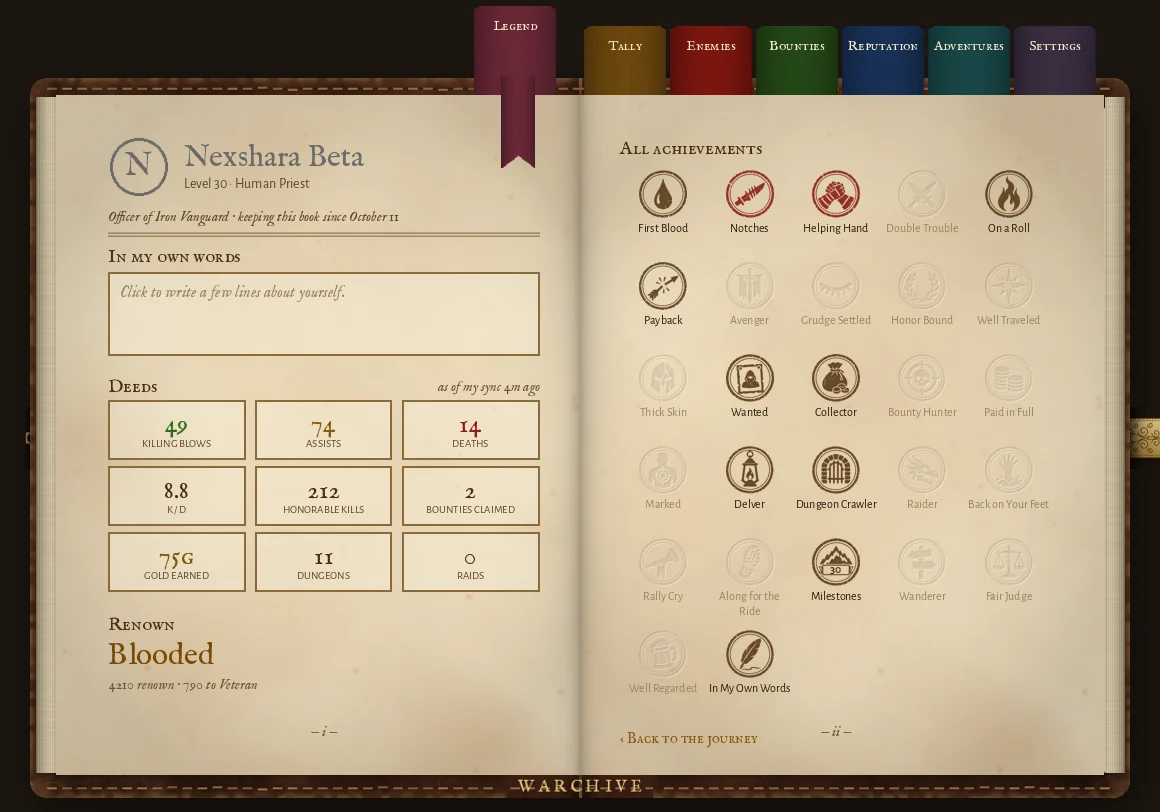
- Your numbers in the journal. The Legend page shows your website totals, your Renown and your achievements. The PvP achievements need confirmed kills, so they only come with Warchive Sync.
- A backup. If the addon gets wiped or you reinstall WoW, your journal comes back.
- Combat log cleanup. WoW never deletes its combat logs. Warchive Sync does, once they're 2 days old.
No Warchive Sync and the addon still does its thing, just without those.
What does the addon do without Warchive Sync?
The Barkeep
- Keeps a list of every enemy you run into, with their class, level and guild when you target them, mouse over them or see their nameplate
- Logs your kills and deaths, and keeps a running count per character
- Bounties: post one (for you or for a friend paying), raise it, claim it. Kill the target and the addon lets you ping whoever pays, then mark it paid. Shared with other Warchive users in your group and guild, and new ones with everyone on your ruleset who has Warchive
- Ratings on the people you group with, shared with Warchive users in your group and guild. Notes on enemies stay yours. Right click someone (or their name in chat) to rate them or put a bounty on them
- Adventures: your dungeon and raid runs, bosses, wipes, deaths and loot. Plus planned adventures: post a dungeon, raid or questing zone, people in your guild ask to join
- Renown and achievements for your runs, levels, ratings and adventures. The PvP ones need Warchive Sync
- Wanted posters, your Legend and Tally pages, all in the journal (
/waror the minimap button)
A few catches. On WoW Forever an addon can't see the combat log, so without Warchive Sync its kill counts are its best guess. Someone you never get a look at stays a first name only. And it trims old entries so your saved file doesn't grow forever.
Without Warchive Sync the addon leaves WoW's combat log off, since nothing would read it. If you turn it on yourself with /combatlog, know that WoW never deletes those files. Clear out World of Warcraft\_forever_\Logs now and then or they'll eat your disk.
Why do I need a whole separate program for the website?
The Barkeep
Because WoW keeps addons in a box. An addon can't go on the internet, can't read or write files on your PC, and on WoW Forever it can't even read the combat log.
The only thing that ever leaves the game is the addon's saved file, and WoW only writes that when you log out or /reload.
So getting anything to a website takes something outside the game to pick that file up and carry it over. That's all Warchive Sync is. Same reason the big log and rating sites have their own desktop apps.
Alright, what does Warchive Sync actually do?
The Barkeep
- Sends your journal. When WoW saves the addon's file, Warchive Sync sends it here.
- Reads the combat log while you play. That's how kills get confirmed: who really landed the killing blow, who helped, kills that happen while you're in the middle of a fight. Once the addon sees Warchive Sync is around it turns WoW's combat log on for you (there's a switch for it in the addon's Settings).
- Brings your numbers back. It writes your website totals into the addon (the Legend and Tally pages) along with a copy of your journal, so you can get it back if the addon gets wiped. While you play, fresh numbers show up a few minutes in.
- Cleans up after WoW. WoW starts a new combat log every session and never deletes them. They get big. Warchive Sync deletes combat logs once they're 2 days old and it's done reading them.
- Tells you about updates. For itself, the addon, and Black Book if you have it. It never installs anything by itself, see below.
- Brings the Notorious list. The enemies who keep killing our faction, for tooltips and the Enemies page.
- Report a problem. In its tray menu. Opens a text file in Notepad: you write what happened, and everything below the line is what gets sent with it. It asks before it sends anything.
What does it touch on my PC, and what does it send?
The Barkeep
Reads
- the Warchive addon's saved file
- WoW's
Logsfolder (the combat logs)
Writes
Warchive_Inbox.lua,Warchive_Mail1.luaandWarchive_Mail2.lua, next to the addon's saved file- the addon itself in
Interface\AddOnswhen you click install or update in its menu, keeping the last 3 versions inInterface\Warchive-backup - Black Book, only if it's already there and you click its update, keeping the last 3 in
Interface\BlackBook-backup - a text file in your Temp folder when you use Report a problem, deleted once it's sent
- its own settings and log in
%APPDATA%\Warchive - two small entries in your user registry: one so it starts with Windows (if you leave that on), one so Windows shows its pop-ups under the name Warchive
Deletes
- combat logs once they're 2 days old and already read
Sends to warchive.dev
- its own sync key, made for your install the first time it runs
- your character names, server and region
- kills, deaths and run-ins with enemy players: names, class, zone, time, and where a kill happened (for the map)
- your bounties, ratings and notes
- your dungeon and raid runs
- a bug report, only when you send one: what you wrote, its version and Windows version, the WoW folders it found, the addon's last 10 errors and the last 100 lines of its log. Sync keys, webhook links, your Windows user name and your WoW account folder get blanked first
Never
- touches the game itself or its memory
- sees your account or password
- plays or clicks anything for you
- reads anything else on your PC
Heads up: ratings and notes you send show up on this website for everyone to read, on the Reputation page. Bounties too. Ratings show your rater ID, not your name, and wait a while before they go out so it's harder to tell who wrote one.
How do I know it's safe? What about updates?
The Barkeep
Nothing updates on its own, ever. When there's a new version the tray icon says so and you click Update if you want it.
Every update is signed. Warchive Sync checks the signature before it uses anything it downloaded and refuses anything that doesn't match, so even if someone broke into this website they couldn't hand you a fake one.
If an update doesn't start right, Warchive Sync puts the old version back by itself.
Windows will probably warn you the first time you run it ("Windows protected your PC"). That's because Warchive Sync isn't code signed with a certificate yet. Click More info, then Run anyway. That warning goes away once it's signed.
Want the long version? The security review covers what each part can reach, what it sends and who gets to see it.
Warchive isn't made by or tied to Blizzard.
Do I have to close WoW for any of this?
The Barkeep
Nope. Install Warchive Sync whenever. It can install or update the addon while you play too, the new version just loads the next time you start WoW (or /reload if it's an update).
Your website numbers reach the journal at login, and once more while you play: the first time you open the journal after a couple of minutes, or 10 minutes in. After that, the next update comes at your next login or /reload. Nothing for you to do.
How do I set it up?
The Barkeep
Warchive Sync
- Download it from Tools of the Trade and put it somewhere it can stay, like
Documents\Warchive - Run it. It shows up in your tray (by the clock) and starts with Windows. You can turn that off in its menu
- No addon yet? Right-click the tray icon (it can hide under the ^ arrow by the clock) and pick Install the Warchive addon. Nothing installs until you click it. Then restart WoW, a /reload isn't enough for a new addon
- Log in once with the addon so it writes its file
Warchive Addon
- Download it from Tools of the Trade
- Unzip it into
World of Warcraft\_forever_\Interface\AddOns. You should end up withWarchive,Warchive_Inbox,Warchive_Mail1andWarchive_Mail2folders in there - Restart WoW, then type
/waror click the Warchive button on your minimap
Right click the minimap button to hide it, /war minimap brings it back.
Why does the addon come with four folders?
The Barkeep
- Warchive is the addon itself, the journal.
- Warchive_Inbox is where Warchive Sync leaves your website numbers and journal backup while WoW is closed.
- Warchive_Mail1 and Warchive_Mail2 are how fresh numbers get in while you play. WoW only reads an addon's saved file when that addon loads, so Warchive Sync writes into one while the addon loads the other, and they take turns.
Keep all four. Without Warchive Sync the other three just sit there empty.
You might also see a Warchive-backup folder next to AddOns. That's Warchive Sync keeping the last 3 versions of the addon it replaced, in case an update goes wrong. Only the addon's files, not your journal. Safe to delete.
What's this WarchiveNet channel?
The Barkeep
A hidden chat channel every Warchive user on your ruleset sits in. New bounties go out over it, so everyone with Warchive hears about them, not just your group and guild. Ratings never go over it.
You won't see it in your chat windows. If it's taken, the addon tries WarchiveNet2 or WarchiveNet3. /war ruleset tells you if you're on it.
Don't want it? Untick Everyone on your ruleset in the addon's Settings, Sharing. Leaving the channel by hand does the same thing.
I deleted the addon or reinstalled WoW. Is my journal gone?
The Barkeep
With Warchive Sync: no. Your stuff is on the website. Log in and out once so Warchive Sync learns your characters, close WoW, and next time you log in the addon fills the book back up by itself. There's also a Restore from website button in the addon's Settings.
Addon only: mostly yes, it only lived in that saved file. Bounties and ratings your group and guild have get shared back to you, the rest is gone.
I got a new PC (or reinstalled Windows). Why won't my character sync?
The Barkeep
The first time Warchive Sync runs it gets its own sync key, and your characters get linked to that key on their first sync. That way nobody else can send stuff as your character or pull your journal down.
A new PC means a new key, so the site won't take your characters from it yet. The tray says something like Sync: down (Vin is linked to another install). Two ways out:
- Message Nex on Discord (nextheoverlord), he can move your characters over to the new install.
- Or just wait. If the old install hasn't been used for 60 days, the next one to sync your character takes it over by itself.
Reinstalling WoW or the addon doesn't matter, the key lives with Warchive Sync, not with WoW.
How do I get rid of it?
The Barkeep
Addon: delete the Warchive, Warchive_Inbox, Warchive_Mail1 and Warchive_Mail2 folders from Interface\AddOns, and the Warchive-backup folder in Interface if it's there.
Warchive Sync: right click the tray icon, untick Start with Windows, then Quit. Delete Warchive.exe and the %APPDATA%\Warchive folder. If you want it spotless, also delete the registry key HKEY_CURRENT_USER\Software\Classes\AppUserModelId\Warchive.App (that's just the name Windows shows on its pop-ups).
Got anything else under the counter?
The Barkeep
Keep this quiet. Some names in this town are better left unheard. I keep them in a little black book. Write down a player, a guild or a word and their chat, bubbles and invites stop reaching you. Ignore list stays clean.
Black Book is a separate addon for WoW Forever. It's a chat filter: add players, guilds or words and their messages, chat bubbles and guild or group invites stop showing up. Your ignore list isn't touched.
Black Book and the other addons are on the shelf in Tools of the Trade.
Anything else, message Nex on Discord: nextheoverlord. The barkeep's heard it all.